
An Etsy shop banner is the shop front, and most buyers decide in seconds whether the shop looks trustworthy enough to browse. The banner sits at the top of every shop page, above every listing, and a blurry, stretched, or off-brand banner tells a buyer the seller does not check their work. The best etsy banner makers fix that problem in an afternoon. They offer templates sized exactly for Etsy, fonts and colours that match the shop, and exports sharp enough to look good on a phone and a desktop. Canva takes the top spot because it pairs the widest Etsy banner template library with the fastest path from a blank canvas to a live shop banner, and its price stays low enough for a seller to keep paying it every month.
Quick jump
The Best Etsy Banner Makers at a Glance
This table compares the best etsy banner makers on the four facts that decide a purchase. Prices are the entry paid tier from each vendor site, checked in November 2026. Where sources disagreed, the guide shows the range rather than picking one figure and hiding the disagreement.
| Tool | Entry paid plan | Free option | Best for |
|---|---|---|---|
| Canva | $18 a month, or $144 a year | Yes | Most Etsy shops |
| Placeit | $14.95 a month, or $89.69 a year | Some free templates | Mockups and banners together |
| Adobe Express | $9.99 a month | Yes | Polished banners on a budget |
| VistaCreate | $13 a month, or $120 a year | Yes | Small teams and multi-shop sellers |
| Snappa | $15 a month, or $120 a year | Yes | Fastest banner |
| Fotor | $8.99 a month, or $39.99 a year | Yes | Photo-led banners |
| PicMonkey | Basic $7.99 a month | Trial only | Photo editing plus banners |
| Design.com | Free to start | Yes | A new shop that needs a logo too |
| Kittl | $19 a month, or $14 billed annually | Yes | Print-on-demand sellers |
| Photopea | Free in the browser | Yes | Free, Photoshop-style editing |
The 10 Etsy Banner Tools in Detail
This section tests the best etsy banner makers against the same three jobs. A banner sized exactly for Etsy, a design that matches the shop brand, and an export sharp enough for a phone and a desktop. Figures in this guide mean the lowest paid plan unless a sentence flags a different basis, all checked in November 2026.
1. Canva
No tool in this list covers more Etsy banner jobs than Canva, which is why it leads. One account handles the shop banner, the listing images, and the social posts that drive traffic to the shop, all from the same design. Its Etsy banner library runs to hundreds of designs for jewellery, printables, vintage, handmade, and digital sellers, and a seller with no design training can finish a banner in an evening. The brand kit keeps the colours and fonts consistent from the banner through to every listing image, which is the detail buyers notice without knowing why.
The free tier does the basics, and Pro costs $18 a month billed monthly or $144 a year billed annually, which works out near $12 a month. Pro buys premium templates, background removal for product photos, and the resize tool that turns the shop banner into a social post and a listing image in one click. The print ordering inside Canva is a bonus for a seller who also sells at craft fairs, because the banner design can become a printed sign without rebuilding.
The weakness is that the free tier limits premium templates, and the most polished Etsy banner designs tend to sit behind Pro. A seller should budget for one month of Pro, design the banner and all listing images, then cancel, which costs $18 for the whole shop refresh. That is still cheaper than hiring a designer for a single banner, and the digital versions cost nothing extra.
2. Placeit
Placeit is the mockup pick, and for an Etsy seller that matters more than it first appears. A banner that shows the product in use, on a model, on a mug, or on a wall, sells harder than a banner that only shows the shop name. Placeit holds over 40,000 mockup scenes where a seller drops in a design and downloads a product photo, and the same subscription covers banner templates, logo templates, and video templates for the shop.
The subscription costs $14.95 a month, or $89.69 a year, which works out near $7.47 a month, and it unlocks unlimited downloads across the whole library. Single templates are also sold one at a time for sellers who need only a handful. The mockup library dwarfs everything else in this category, and assets downloaded while subscribed remain the seller’s after cancellation.
The limit is design depth. Placeit is a template and mockup machine, not a full design editor, so a seller who wants a completely custom banner will find the controls limited. The right workflow is to design the banner in Canva or Adobe Express, then place the product shots in Placeit mockups and drop them into the banner. Used together, the two tools cover design and presentation for less than $25 a month.
3. Adobe Express
When a banner has to look polished and there is no designer on staff, Adobe Express is the tool to reach for first. The templates are tidier than most rivals, the typography is better, and the Adobe Stock assets give a small shop access to photography it could never shoot itself. A banner for a jewellery shop needs a hero image that looks expensive, and Adobe Express supplies one in the same canvas where the words go.
It starts free with limits, and Premium runs $9.99 a month billed monthly, or $99.99 for the year. That is one of the cheapest paid entries in this list, and it bundles 250 Firefly generative credits a month with 4,000 Adobe Fonts, so a seller can generate a background image and set the shop name in a typeface no rival shop is using. The free tier carries a usable set of templates and 5 GB of storage, which is enough to run a real shop before paying anything.
The trade-off is template depth. Adobe Express has fewer Etsy-specific templates than Canva, so a seller with a very specific niche may find the library thin. The editor is also simpler, which is a strength for a fast banner and a limit for a seller who wants fine control over every layer. For most shops, the price and the polish outweigh both limits.
4. VistaCreate
VistaCreate earns its place on team value. One Pro plan covers up to 10 team members for $13 a month billed monthly, or $120 a year billed annually, which works out near $10 a month. That flat team price is the cheapest way in this list to put a whole shop team on one paid plan, and it includes unlimited brand kits, unlimited storage, and a one-click resizer. A seller running two or three Etsy shops from one account gets professional tools without a per-seat bill that grows every time a new shop opens.
The free Starter plan is genuinely usable, with 100,000 templates and 10 GB of storage, and Pro adds 200,000 templates plus a library the vendor states as 170 million photos, videos and vectors. The animated template range is a bonus for a shop that promotes on social media, since a moving banner stands out in a feed where a static one scrolls past.
The weakness is polish. VistaCreate templates can feel less refined than Adobe Express, and the photo library quality is uneven, so a banner built here needs a careful eye on the hero image. The editor also lacks the deep brand controls of Canva Pro. For a seller on a tight budget who runs several shops, those limits are easy to live with.
5. Snappa
Snappa is built for speed. The editor has fewer menus than Canva, the templates are sized for social media and shop banners, and a seller can go from idea to finished banner in a few minutes. That speed matters when a shop refreshes its banner for a sale, a season, or a new product line, and the seller would rather spend the evening making products than making graphics.
The free plan covers 3 downloads a month, and Pro costs $15 a month billed monthly, or $10 a month billed annually at $120 a year. Pro adds unlimited downloads, background removal, custom font uploads, and integrations with Buffer and social platforms, which suits a solo seller who publishes the banner and the social post together. Team plans run $20 a month per user billed annually.
The limit is depth. Snappa has fewer templates than Canva or VistaCreate, and its editor offers less control over fine details. A shop that refreshes its banner often will find the speed worth the trade. A shop that needs a wide template range for many product lines will outgrow it quickly.
6. Fotor
Fotor is the photo-led pick, and the cheapest paid entry in this list. Its strength is photo editing, with AI enhancement, background removal, and one-click improvements that make a phone photo of a handmade product look presentable on a banner. A shop whose best asset is its product photography will get more from Fotor than from a template-led tool, and the banner templates are clean enough for a shop refresh.
Pro costs $8.99 a month billed monthly, or $39.99 a year, which works out near $3.33 a month, and Pro+ runs $19.99 a month. The free Basic plan covers basic editing with limited AI credits and 512 MB of storage. At that price, Fotor is the easiest paid upgrade in this list to justify to a seller watching every dollar, and a year of Pro costs less than a single promoted listing campaign.
The weakness is template range. Fotor is a photo editor with banner templates attached, not a banner tool first, so a shop that needs many different banner styles will find the library thin. The right workflow is to enhance the product photo in Fotor, then build the banner in Canva or Adobe Express, though a simple banner can be finished in Fotor alone.
7. PicMonkey
PicMonkey is the photo editor that also makes banners. Its tools cover filters, effects, text, and graphics in one place, and a seller can take a product photo, clean it up, add the shop name, and export a banner without leaving the editor. The touch-up tools are stronger than Canva for a seller who works with real photography every day, and the collage maker helps a shop show several products in one banner.
Basic starts at $7.99 a month and Pro at $12.99 a month, and there is no permanent free plan, only a free trial. That is the first thing a buyer should know, since every other tool here offers a free tier. What the money buys is a focused photo editor with banner templates built in, and a seller who already edits product photos daily will find the workflow faster than switching between two tools.
The limit is the missing free tier and the narrower template range. A seller who only needs a banner once a year should not pay a monthly subscription for it. A seller who edits product photos every week and wants the banner in the same place will find the price fair.
8. Design.com
Design.com fits a shop that also needs a logo. Its banner templates sit beside a logo maker, so a new seller can build the shop logo, then carry that mark onto the banner, the listing images, and the social profiles from one account. That single-brand workflow is the honest reason to pick it, and it suits a launch better than an established shop that already owns its brand.
It is free to start, with paid plans on the vendor site for premium templates and high-resolution downloads. The banner templates are serviceable rather than striking, and the library is smaller than the leaders here, so a shop that wants a distinctive banner will find the range thin. The logo tools are the stronger half of the product, and a new shop that needs both in one afternoon gets real value.
The right use is narrow. A new Etsy shop that needs a logo, a banner, and a basic brand kit in one evening gets all three here. An established shop with a logo it already loves should spend its money on a design tool with a deeper banner library instead.
9. Kittl
Kittl is the print-on-demand pick. Its AI-first design platform builds text effects, vector graphics, and print-ready artwork for merchandise sellers, and an Etsy shop selling t-shirts, mugs, or posters will find its tools closer to the product than any general banner maker. The banner becomes a showcase for the artwork itself, which is exactly what a print-on-demand buyer wants to see.
The free plan covers 5 projects with a one-time allowance of 100 AI tokens and low-resolution exports for personal use only. Pro costs $19 a month billed monthly, or $14 a month billed annually ($168 a year), with 2,000 monthly AI tokens, high-resolution export, and a commercial licence for up to 500,000 copies. Expert, at $49 a month billed monthly, or $39 a month billed annually, adds brand kits and 12,000 AI tokens a month (6,000 monthly plus 200 a day).
The limit is scope. Kittl is built for merchandise artwork, not for general shop banners, and a seller who does not sell printed products will find half its features unused. The commercial licence cap of 500,000 copies also matters for a shop that scales past it. For a print-on-demand seller, it is the most powerful tool on this list. For anyone else, it is the wrong tool.
10. Photopea
Photopea is the free pick, and the only tool here that works like Photoshop in a browser. It opens PSD, XCF, and Sketch files, handles layers, masks, and smart objects, and exports at any size a seller needs, all without installing anything or paying anything. A seller who already knows Photoshop, or who buys banner templates in PSD format, can edit them here for free.
The free version runs in the browser with ads, and a Premium plan removes them. There is no template library, no brand kit, and no hand-holding, which is both the strength and the limit. A seller who wants a finished banner in ten minutes should pick Canva. A seller who wants full control over every pixel, and is happy to learn the tool, will find Photopea the most capable free editor available anywhere.
The right buyer is a seller with design skill and no budget, or a seller who buys professional PSD banner templates and needs a free editor to customise them. For everyone else, the learning curve costs more than the subscription it saves.
The Etsy Banner Sizes That Actually Matter
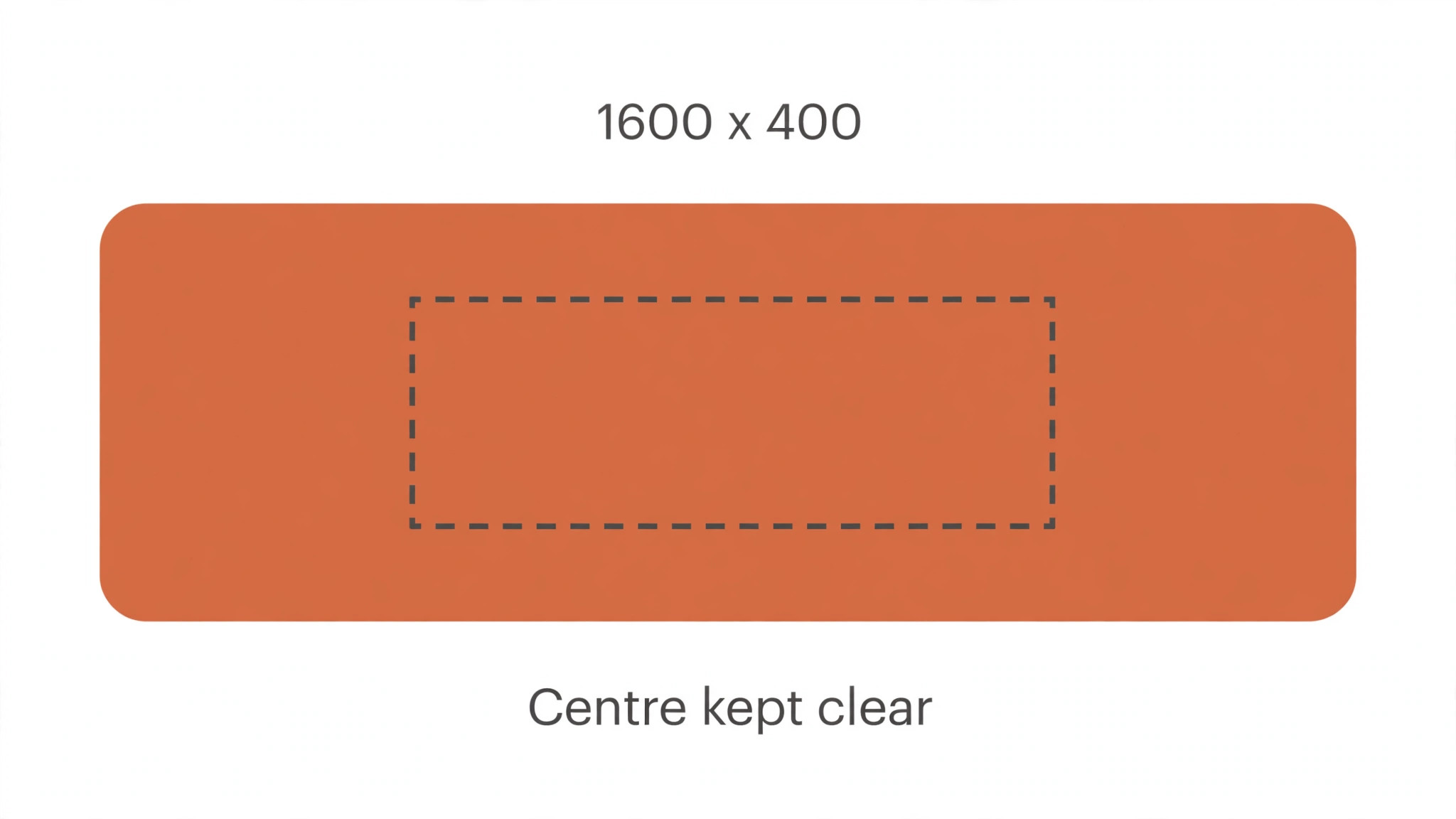
Etsy sets the big shop banner minimum at 1200 by 300 pixels and recommends 1600 by 400 pixels, and that pair of numbers decides whether a banner looks sharp or soft. A banner uploaded below the minimum gets stretched, and a banner uploaded at the wrong aspect ratio gets cropped, usually across the shop name. The best etsy banner makers offer a template at the recommended 1600 by 400 pixels, so the seller never has to guess, and the tools that lack that template force the seller to build a custom size by hand. The mini banner minimum is 1200 by 160 pixels, recommended 1600 by 213 pixels.
The banner also behaves differently on a phone and a desktop. On a desktop, the full banner shows. On a phone, less of the banner shows at once, so keeping the shop name and the key message near the centre is the safe choice. Etsy publishes no exact mobile safe zone, so centre placement is advice, not a specification. The fix is to keep the important text and the logo in the middle third of the banner, with decoration at the edges, and to preview the banner on a phone before publishing. Canva, Adobe Express, and VistaCreate all offer the right template size and a phone preview, and the sellers who use them avoid the most common banner mistake on Etsy.
The listing images deserve the same attention. Etsy recommends listing photos at least 2000 pixels on each side, and a banner that matches the listing images in colour and font makes the whole shop look like one brand. The tools with a resize feature turn the banner into listing images in one click, and the seller who uses that feature will have a shop that looks designed rather than assembled. The best etsy banner makers treat the banner and the listing images as one job, not two, and the shop that follows that lead looks professional from the first click.
What an Etsy Banner Really Costs
The cheapest honest route in this list is Photopea, which costs nothing, followed by Fotor Pro at $39.99 a year and Placeit at $89.69 a year. Adobe Express Premium at $99.99 a year and VistaCreate Pro at $120 a year sit in the middle, and Canva Pro at $144 a year costs more but replaces a template library, a stock photo subscription, and a resize tool. PicMonkey Pro at $12.99 a month and Kittl Pro at $19 a month are the dearest monthly entries, and both justify the price only when their specialist job, photo editing or print-on-demand artwork, is the reason the shop exists.
The free tiers deserve a second look. Canva, Adobe Express, VistaCreate, Snappa, Fotor, Design.com, Kittl, and Photopea all offer one, and a new shop can design its banner and all its listing images without paying any of them. The cost that matters is not the first month. It is the month the shop needs brand kits, background removal, and premium templates all at once, and that month arrives when the shop starts selling regularly. Before that month, one month of Canva Pro at $18 covers a full shop refresh, and the seller can cancel when the work is done. The best etsy banner makers keep that month cheap by putting the resize tool and the brand kit on the same low tier, instead of splitting them across two upgrades.
The Banner Mistakes That Cost Sales
The first mistake is text at the edges. A shop name stretched across the full width of the banner looks fine on a desktop and disappears on a phone, where Etsy crops the sides. The fix is simple and costs nothing. Keep the shop name, the key message, and the logo in the centre third of the banner, and leave the edges for decoration. Every seller who checks the banner on a phone before publishing avoids this mistake, and every seller who skips that check learns about it from a buyer who could not read the shop name.
The second mistake is a blurry banner. A banner uploaded at a smaller size than 1200 by 300 pixels gets stretched, and a stretched banner tells a buyer the seller does not check their work. The fix is to design at exactly the right size, export at high quality, and never reuse a social media image as a shop banner without resizing it. The tools with a template at the right size make this mistake impossible, which is one more reason to pick a tool with an Etsy template rather than a general design tool.
The third mistake is a banner that shows no products. A banner that only shows the shop name wastes the largest image on the shop page, and a buyer who sees no product has no reason to scroll down. The best etsy banner makers make it easy to show the product, with mockup scenes, photo-led templates, and a resize tool that turns a product photo into a banner in minutes. Show the best seller, or three products that represent the range, and let the banner do the selling before the buyer reaches a listing.
Best Pick by Job
| Job | Best pick | Why |
|---|---|---|
| Most Etsy shops | Canva | Widest banner library, fastest shop refresh |
| Mockups and banners together | Placeit | 40,000 mockup scenes, unlimited downloads |
| Polished banners on a budget | Adobe Express | $9.99 a month with Firefly credits and good type |
| Small teams and multi-shop sellers | VistaCreate | One Pro plan covers up to 10 people |
| Fastest banner | Snappa | Fewest menus, finished in minutes |
| Photo-led banners | Fotor | AI photo enhancement, cheapest paid tier |
| Photo editing plus banners | PicMonkey | Touch-up tools and banners in one editor |
| A new shop that needs a logo too | Design.com | Logo and banner from one account |
| Print-on-demand sellers | Kittl | Vector artwork and AI generation for merch |
| Free, Photoshop-style editing | Photopea | Full layer editing in the browser for nothing |
Questions Sellers Ask Before Publishing
What size should my Etsy banner be?
Etsy sets the big shop banner minimum at 1200 by 300 pixels and recommends 1600 by 400 pixels, so design at the recommended size. The mini banner minimum is 1200 by 160 pixels, recommended 1600 by 213 pixels. Keep the shop name and the key message near the centre, since less of the banner shows at once on a phone. Export as a high-quality JPG or PNG, and check the banner on a phone before publishing, since most buyers shop on mobile.
How often should I change my shop banner?
Change it for a season, a sale, or a new product line, and leave it alone otherwise. A banner that changes every week confuses returning buyers, and a banner that never changes looks abandoned. Three or four refreshes a year is the right rhythm for most shops, and a tool with saved templates makes each refresh a ten-minute job.
Can I use the same banner on Etsy and social media?
No, not directly, since each platform wants a different size. The design can stay the same, but the banner must be resized for each place, and the tools with a one-click resizer handle that in seconds. Canva Pro, VistaCreate Pro, and Adobe Express Premium all resize a banner into social sizes without rebuilding it.
Do I need a paid plan to make a good Etsy banner?
No, not at first. Canva Free, Adobe Express Free, VistaCreate Starter, and Photopea all make a sharp, professional banner without paying. The paid plan becomes worth it when the shop needs brand kits, background removal, or premium templates, and one month of Pro at $18 covers a full shop refresh for most sellers.
Should my banner show products or just my shop name?
Products, always. A banner that only shows the shop name wastes the largest image on the shop page. Show the best-selling product, or three products that represent the range, with the shop name small and clear beside them. A buyer who sees the product in the banner is already halfway to clicking a listing.
The Banner That Makes Buyers Stay
The best etsy banner makers do not win on template count alone. They win on the three tests that decide whether a banner works, a size that matches Etsy exactly, a design that matches the shop brand, and an export sharp enough for a phone and a desktop. Canva leads because it passes all three at a price a seller can keep paying, and its resize tool turns one banner into a whole shop refresh. Placeit is the pick for a seller who wants mockups with the banner, Adobe Express is the pick for a polished banner on a small budget, and Photopea is the pick for a seller with design skill and no budget at all. Pick the tool that matches the shop, keep the important text in the centre third, and refresh the banner when the season changes, not every week. Start with the free tier, design the banner, and check it on a phone before publishing. The tool that survives that test earns the subscription, and the shop that keeps one consistent look will earn the buyer’s trust before they read a single listing.