

Wix wins for most food trucks, because it puts the menu, the weekly schedule and commission-free ordering on one page that a hungry customer can read from a phone in ten seconds. A truck does not need a corporate website. It needs a page that answers three questions fast. Where are you today, what are you serving, and how do I order. The best website builders for food trucks are the ones that answer those three questions before the customer scrolls, and that let the owner change the answers from the kerb in under a minute.
A food truck website fails in a different way from a restaurant website. A restaurant sits in one place, so its address never changes. A truck moves every day, sometimes twice a day, and a stale location page sends customers to an empty car park. The menu changes too, because a truck runs out of its best-selling dish by two in the afternoon and swaps in something else. A builder that makes updates slow or fiddly will leave the site wrong most of the week, and a wrong site is worse than no site at all, because it breaks trust with the exact people who tried to find you.
Price matters in a particular way here. A truck already pays for fuel, pitch fees, ingredients and card processing, so a website that costs 100 dollars a month has to earn its keep. At the same time, the cheapest option is rarely the right one if it cannot take an order. A customer who finds your menu and then has to phone you to order will often just walk to the next stall. The right budget is the cheapest plan that takes payments, shows today’s location clearly, and lets you edit the menu from your phone while the fryer is running.
Quick jump
- The 10 Tools at a Glance
- Best Pick by Job
- The 10 Tools in Detail
- How to Choose the Best Website Builders for Food Trucks
- Wix vs Squarespace for a Food Truck
- The Seven-Day Location Workflow
- What Does a Food Truck Site Really Cost in Year One?
- Frequently Asked Questions
- The Verdict: Wix Takes It for Most Food Trucks
The 10 Tools at a Glance
This table compares the best website builders for food trucks on the things that decide a purchase for a moving business. The table prices are the cheapest paid plans on annual billing, checked against vendor pages and recent roundups in November 2026. Where the sources give different numbers, this guide flags the clash instead of smoothing it over, and every price is worth a checkout check before you pay.
| Tool | Entry paid plan | Free option | Best for |
|---|---|---|---|
| Wix | $17 a month | Yes | Most food trucks |
| Squarespace | $19 a month | 14-day trial | Food photography and clean menus |
| Square Online | Free to start | Yes | Trucks already using Square |
| WordPress.com | $4 a month | Yes | Content and search traffic |
| Design.com | Free to start | Yes | Quick start with a matching logo |
| GoDaddy | $9.99 a month | Trial | Fastest first site |
| Hostinger | $2.99 a month | No | Lowest entry price |
| Menubly | $9.99 a month | Trial | Menu plus commission-free ordering |
| Duda | $19 a month | Trial | Owners running several trucks |
| Jimdo | $9 a month | Yes | A simple one-page site |
Best Pick by Job
The table below matches each job to one of the best website builders for food trucks, so you can skip the full comparison once you know your job. A truck that sells at festivals needs different tools from a truck that parks in the same office lot every weekday, and the pick changes with the job.
| Job | Pick | Why it wins here |
|---|---|---|
| One truck, daily moves | Wix | Menu, schedule and ordering in one place |
| Looks matter most | Squarespace | Food photos that sell the dish |
| Already taking Square payments | Square Online | Ordering syncs with the till |
| Blog and search traffic | WordPress.com | Cheapest paid plan with a custom domain |
| New truck, no brand yet | Design.com | Logo and site built together |
| Tightest budget | Hostinger | Lowest entry price by a wide margin |
| Ordering without commission | Menubly | Built-in ordering at a flat monthly price |
| Several trucks or sites | Duda | Manage every truck from one dashboard |
The 10 Tools in Detail
This section tests the best website builders for food trucks one at a time, against the same three jobs. A tool earns its place by making the location, the menu and the order easy, not by having the longest feature list. All prices here are the cheapest paid plan on annual billing unless the text says otherwise, and each was looked up in November 2026.
1. Wix
No other builder here covers as many truck jobs in one place, so Wix leads, with menu, schedule, ordering and catering enquiries running without a plugin hunt. A beginner can drag text, photos and buttons into place, and the food-business templates give real starting points instead of a blank page. A truck owner can publish a decent site in a weekend, then add online ordering, a schedule calendar and a catering enquiry form later without rebuilding. That path matters, because most owners start with a simple page and only discover what they need after the first busy month.
Once you look past the headline, the pricing holds up. Light at $17 a month on annual billing brings a custom domain, no Wix ads and 2 GB of storage, which fits a straightforward site with a menu and a location page. Core at $29 a month adds payments, scheduling and basic ecommerce, and that is the plan most trading trucks actually need, because taking an order is the point of the site. The jump from $17 to $29 is $144 a year, so a truck that takes pre-orders should budget for Core from the start rather than discovering the limit on a busy Friday.
A worked example turns the plan prices into a yearly bill you can judge. A truck running Core pays $348 for the year, plus about $12 to renew the domain after the free first year, for a year-one total near $360 before payment fees. Payment processing adds roughly 2.9 percent plus 30 cents per sale, so a $12 order costs about 65 cents in fees. Those fees apply on every builder that takes cards, so they are not a reason to avoid Wix, but they belong in the budget, and they are the reason commission-free ordering matters so much to a low-ticket business.
Lock-in is the drawback here. Moving off Wix is not an export, it is a rebuild, because the site cannot travel to another host. A first-time owner can lose a whole evening inside the editor, fussing over tiny details no customer will ever see. Fix a launch date before you even open the editor. Put the site up across two evenings, then tidy one page a week after that. A live site with today’s location beats a perfect site that never launches.
2. Squarespace
Squarespace is the pick for trucks that sell on looks. Its templates keep a tight grip on spacing and type, so the finished pages look designed by hand rather than pieced together. A truck with strong food photography benefits most, because visitors judge the food by the frame around it. The editor limits where each block can sit, which stops a rushed owner mid-service from wrecking a tidy menu page. You trade freedom for taste, and for a food business that trade is often worth it.
The pricing is easy to follow. Basic at $19 a month on annual billing covers a site with a shop and a 2 percent transaction fee, while Core at $29 a month drops that fee to zero. Some roundups put Squarespace Basic lower, at $16 a month, but that number is unconfirmed on the vendor page checked here, so budget on $19 to stay safe.
A truck selling $2,000 a month through the site pays $40 in transaction fees on Basic, so Core pays for itself once monthly sales pass about $500. Run that arithmetic before you commit, because the cheaper plan can cost you more once the orders start coming in.
The limit for a truck is ordering. Squarespace does not include a full restaurant ordering system of its own, so ordering usually runs through an integration such as Tock or ChowNow, which adds cost and another dashboard to check. A truck that only needs a menu and a schedule will never notice this. A truck that wants pre-orders should price the integration before committing, because the combined bill can pass Wix Core within a few months.
3. Square Online
Square Online is the obvious pick for a truck that already takes payments through Square, and that describes a large share of food trucks. The free tier builds a website and an online ordering profile that syncs with Square POS, so a dish sold out at the window shows as sold out online without anyone typing it twice. That single sync saves more time in a week than any design feature, because a truck owner is cooking, serving and driving, and does not have evenings to spare for admin.
The pricing is honest but needs reading carefully. The free tier costs $0 a month and includes the website builder, ordering, pickup and delivery, and ordering through Google, but it does not include a custom domain. Online card payments cost 3.3 percent plus 30 cents, which is higher than the 2.9 percent most builders charge, so a $12 order costs about 70 cents in fees.
Square Plus costs $49 a month per location and adds a custom domain, expanded design, QR code ordering and loyalty tools, with a 30-day free trial. That is a steep jump from free, so most single trucks should start on the free tier and upgrade only when the domain and the QR ordering earn their keep.
The design is the trade-off. Square Online sites look clean and functional, but they do not match Squarespace for looks, and the template choice is narrower than Wix. A truck that competes on appearance may find it plain. A truck that competes on speed, reliability and low cost will find it more than good enough, and the fact that the till, the website and the ordering all live in one account is a real advantage on a busy service.
4. WordPress.com
WordPress.com is the cheapest credible route to a site with a custom domain, and it suits trucks built around content and search traffic. For $4 a month on annual billing, Personal drops the ads, adds a custom domain and opens the WordPress editor that millions of writers already use. Premium at $8 a month buys more design control, while Business at $25 a month unlocks plugins and full ecommerce. Each step up the ladder buys a genuine capability, not a cosmetic extra.
The pricing is the friendliest in this list at the bottom and the hardest to follow at the top. A truck on Personal pays $48 for the year, which is less than two months of Wix Core. That saving buys a lot of content, and content is what brings search visitors who type the name of a dish or a neighbourhood into Google. The catch is that selling needs Business at $25 a month, or $300 a year, which costs more than Wix Core, and the owner then has to choose and maintain the ordering plugin herself. That is a real cost, paid in evenings, even when the monthly bill looks small.
5. Design.com
A new truck usually needs a logo and a website at the same time, and Design.com earns its place here by letting one account produce both before the first pitch. You can shape a logo, settle on matching colours, and put a simple site together around them with no designer and no design skills needed. The site builder is simpler than Wix or Squarespace, and that simplicity is the point for an owner who wants a tidy online presence rather than a complex one, especially in the first season when the brand is still forming.
Depth is where it runs short. Design.com handles a menu page, a location page and a simple shop, but it does not match Wix on ordering or Squarespace on design polish. An owner who outgrows it will move to a bigger builder, and that move means rebuilding. Use it as a quick, tidy launchpad for the first season, then move on when the truck grows. When the job list is short and the brand is still taking shape, having the logo, truck wrap and site match is a real advantage. When the job list runs long, Wix is the better starting point.
You can start free and pay later for a custom domain and the fuller feature set, but confirm the checkout price first, since the plans move around. What you are paying for is the whole bundle working together, not one standout feature. A new truck that needs a logo, a site and a menu board from one account will save time, and time is the resource a new owner has least of in the weeks before launch.
6. GoDaddy
A truck owner who wants a site live before the weekend will get there quickest with GoDaddy. Its setup asks a handful of questions, chooses a template, drafts the opening text, and goes live before the day is out. An owner who has delayed a website for a year will get one finished here, and a finished site beats any feature table. The entry plan costs $9.99 a month, and the builder packs in basic marketing tools that prompt you to send a first email and post a first update about a new pitch.
For a first site, the best website builders for food trucks are the ones you will actually finish, and GoDaddy is built for exactly that kind of owner.
7. Hostinger
Hostinger is the cheapest way onto this list, and the design shows it. At $2.99 a month on a long term, its entry plan undercuts every other paid builder here by a wide margin, and its AI builder drafts a first site from a few prompts. A truck with hardly any budget can still put a smart-looking site online for less than a coffee a month. The renewal jumps sharply, reported at $10.99 a month once the term ends, so plan around the renewal, not the opening offer, and confirm it at checkout before locking in.
8. Menubly
Menubly is the specialist in this list, built for restaurants and trucks rather than for every kind of business. It bundles the website, the menu and commission-free ordering for $9.99 a month, which makes it the cheapest route to taking orders without paying a marketplace a share of every sale. A truck that takes most of its orders online will save more on commission in a month than the plan costs, and that arithmetic is the whole case for it.
The trade-off is breadth. Menubly does a narrow job well, and it does not try to be a general website builder. A truck that also wants a blog, a catering enquiry system and a merch shop will outgrow it, and the design options are narrower than Wix or Squarespace. The right buyer is a truck whose site is mainly a menu and an order button, and who wants that job done cheaply and well. If your site is mostly a menu, Menubly deserves a trial before you pay three times as much elsewhere.
9. Duda
Duda is aimed at people who build sites for clients, so its dashboard, permissions and white labelling all assume more than one site. Client management, white labelling and team permissions are built in, which makes it the pick for an owner running several trucks, or a small agency building sites for local food businesses. The entry plan at $19 a month is not the cheapest, but the time it saves on managing multiple sites pays for itself quickly when every truck needs its own location page and menu.
A single truck owner will not use half of what Duda offers, and should not pay for it. The value appears when the second truck arrives, or when the owner starts managing sites for friends in the trade. The editor is capable, the templates are clean, and the multi-site dashboard is the best in this list. Choose Duda when you are running a small fleet. Choose Wix when you are running one truck.
10. Jimdo
Jimdo is the smallest tool here, and it suits the smallest operation. The free tier handles a basic site, while the $9 a month plan adds a custom domain and takes the ads away. Jimdo’s AI builder turns a few answers into a first site, and the editor stays plain enough for someone who has never built a page. A weekend market stall, a part-time truck or a seasonal vendor will find Jimdo enough for a menu, a location and a phone number.
Growth is where it stops keeping up. Jimdo has a thin app store beside Wix, and ordering depth is limited. A truck that plans to add pre-orders, catering enquiries or a loyalty scheme should start elsewhere. A truck that means to stay small will never bump into those limits, and the plainness is a strength, not a flaw. Publish the one page, keep it current, and spend your evenings cooking instead of editing a website.
How to Choose the Best Website Builders for Food Trucks
Start with the job, not the feature list. Write down the three things a visitor must be able to do on your site, in order. For most trucks the list is short. Find today’s location, see the menu, and order or call. A builder that fights you on those three tasks is the wrong one for a truck, however long its feature page runs. Test each one with those three tasks before you look at templates, because a pretty template cannot fix a location page buried three clicks deep.
That three-task test is the fastest way to judge the best website builders for food trucks before you compare prices, because a builder that passes it will serve a real customer on a real service day.
Work from the true monthly cost, not the price on the sales page. The entry plan is just the first line of the bill. Then add the domain renewal once the free first year ends, roughly $11 to $15 a year for a .com, plus a business inbox when the plan leaves that out.
Add ordering fees and any app the builder charges for separately. A $17 plan that needs a $10 ordering app costs more than a $29 plan that includes ordering, and the gap grows every month you keep paying it. For a low-ticket business, commission is the cost that matters most, so a commission-free plan beats a cheaper plan that takes a share of every order.
Wix vs Squarespace for a Food Truck
Wix wins on breadth among the best website builders for food trucks. Its template library is the widest here, its app shelf the deepest, and its editor lets you drop each block where you want it. A truck can add ordering, a schedule calendar and a catering form, all without leaving Wix.
The drawback is having too much to choose from. New users open the editor, see a hundred options, and spend an evening deciding instead of publishing. The Light plan at $17 a month on annual billing covers a simple site with a custom domain, and Core at $29 a month adds payments and ordering, which is the plan most trading trucks actually need.
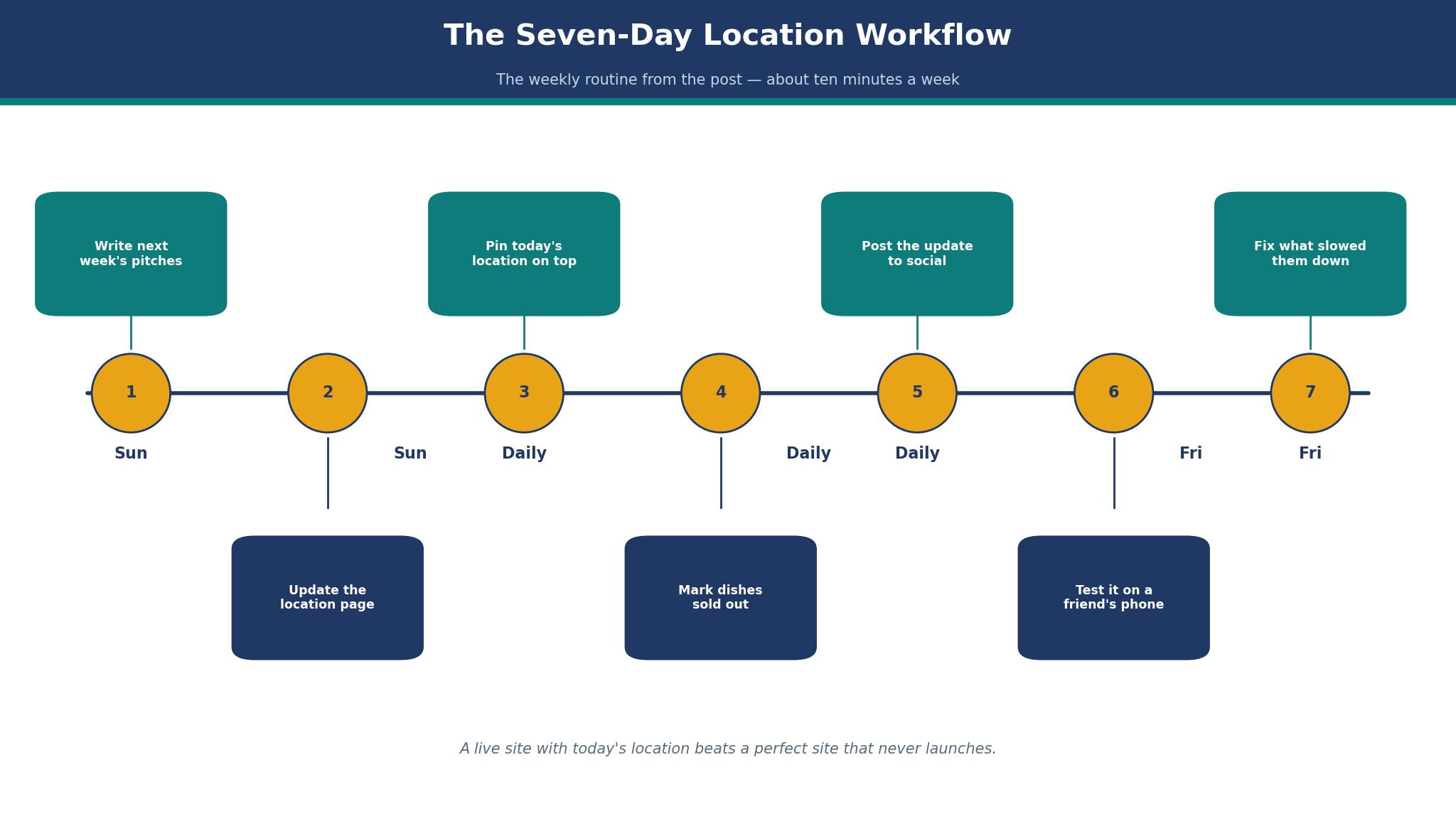
The Seven-Day Location Workflow
A truck website stays accurate only if updating it becomes a habit, not a project. The workflow below takes about ten minutes a week, and it is the overview-proof core of this guide, because no short answer can replace a routine that fits a real service week.
First, on Sunday evening, write next week’s pitches in one place, with the day, the place, the hours and the best-selling dish for each stop. Second, open the site on your phone and update the location page for the whole week in one sitting, rather than editing it each morning.
Third, pin today’s location and hours at the very top of the home page, above the menu, so a customer never has to hunt for it. Fourth, set the menu to show sold-out dishes as sold out, not as available, and remove a dish the moment it runs out. Fifth, post the same update to your social accounts with a link back to the site, so the site stays the single source of truth.
Sixth, on Friday, check the site on a friend’s phone and ask them to find today’s location in ten seconds. Seventh, fix whatever slowed them down before the weekend rush, even if the fix is only moving one line of text higher on the page.

What Does a Food Truck Site Really Cost in Year One?
Work out the full first-year bill before settling on any of the best website builders for food trucks, because the plan price on the sales page is never the whole story. A truck on Wix Core pays $348 for the plan, about $12 to renew the domain in year two, and nothing else in year one while the first-year domain stays free. A truck on Squarespace Basic pays $228. A truck on WordPress.com Personal pays $48. Those three totals sit $300 apart, and the gap buys ordering, design, or a year of writing, depending on the job.
Commission is the third cost, and it surprises new sellers. A $12 order costs about 65 cents in card fees on most builders, and a truck taking $2,000 a month through its own site pays about $110 a month in card fees. A marketplace charging 15 percent on the same sales would take $300, so owning your ordering page saves about $190 a month at that volume. That saving is larger than the cost of any plan in this list, which is why the ordering terms matter more than the monthly plan price.
Frequently Asked Questions
How much does a food truck website cost each month?
Most food trucks should pay between $4 and $29 a month on annual billing for the plan itself, plus a domain renewal of about $12 a year after the free first year. A simple menu and location site sits at the low end, and a site that takes pre-orders sits at the high end. Should the total pass $40 a month before card fees, ask whether those extra features serve a job you actually do, since plenty pay for tools they never open.
Can I take pre-orders without paying a marketplace commission?
Yes, if you choose a builder with commission-free ordering, such as Wix Restaurants or Menubly. You still pay the card processing fee on each order, usually around 2.9 percent plus 30 cents, but you keep the rest. A marketplace typically charges 15 percent or more on top of card fees, so a truck taking $2,000 a month online saves roughly $200 a month by owning its own ordering page.
Do I need a designer to build a food truck site?
No, a designer is not needed for a first site. The builders in this guide are made for owners, and a careful owner can publish a good site in a weekend. A designer is worth the fee when the site has to stand apart, when the truck wins on looks, or when the owner has no hours to spare. Save the designer for a refresh in year two, once a season of traffic has shown which pages matter most.
Is a free website builder plan good enough for a food truck?
A free plan lets you try the builder, but a truck trading on it looks unfinished to customers. Free plans show the builder’s branding, use a subdomain, and limit the features a truck needs, which tells visitors the business is not yet serious. Buy the cheapest plan that brings a custom domain and drops the ads, and move up only when ordering outgrows it. The cost is less than one lost customer a day.
How long does it take to build a food truck website?
A straightforward menu and location page takes a weekend, or roughly ten to fifteen hours fitted around service. A site with ordering takes two to three weeks, because each menu item needs a photo, a price and a description, and the ordering flow needs testing with a real card. Writing the words takes longer than building the pages, so get the menu text ready before you open the builder. A site built in a rush with placeholder text stays a placeholder, while a site with real words sells from the first week.
Which builder is easiest for a complete beginner?
GoDaddy is the easiest of the ten to actually finish, since its step-by-step setup settles most choices on your behalf. Wix is the easiest of the three to grow with, since its editor forgives mistakes and its help pages answer plainly. Squarespace makes beauty the easiest of the three, since its templates carry most of the design themselves. Choose the kind of ease you need most, whether that is getting finished, growing later, or looking good from day one.
The Verdict: Wix Takes It for Most Food Trucks
Wix wins this list of the best website builders for food trucks because it covers the most jobs for the most owners, at a price a truck can afford. Squarespace is the better pick for a truck that sells on looks with a short job list, and Square Online is the better pick for a truck already taking Square payments. Menubly is the pick when ordering without commission matters most, and WordPress.com is the better pick for a truck built on writing and search traffic.
Start with the job, count the real year-one cost, and choose the editor you will actually open before service. A live site that tells the truth and works on a phone will always beat a prettier one that never gets published.